

I’m tired of pasting Claude’s output into Slack and watching it render like a JSON blob with extra steps.
You know the look. Bold shows up as literal asterisks. Headings render as a hash mark and a space. The link you wrote in markdown sits there in brackets, doing nothing. Code fences print the language hint as the first line of the block. Pipe tables collapse into one ugly run-on. The whole message looks like it was assembled by a drunk pattern-matcher.
Eight distinct ways, by my count. Same eight every time, no matter what shape the model’s output takes.
So I built a skill. It’s free, even though most tools I ship are annual-only. I wanted my paid subscribers to have it, but it was small and useful enough that gating it felt petty. So here it is. Everyone gets it.
What it does
The skill lives at the user level — the place every Claude Code instance on your machine reads from. It fires on natural phrasing. "Slackify this." "Copy for Slack." "Give me a Slack recap." You don’t need to remember the word skill. You ask for the thing; the skill notices.
When it fires, it does four things:
Pulls the work from the current session — what got built, what got changed, what decisions were made, who came up.
Drafts a Bottom-Line-Up-Front message at a length tier picked by how many real decisions actually happened.
Runs the draft through a 200-line lint that catches the 8 ways Slack quietly mangles output.
Pipes the linted text to pbcopy. You hit Cmd+V. It renders right.
That’s the whole loop. No bot. No app. The message lands in your clipboard, and it comes from you.
How I built it

Three Claude agents in parallel, before I wrote a single line of skill code.
The first one built the definitive Slack formatting reference. What works. What silently breaks. The “Apply formatting” paste-prompt mechanics. An 8-rule lint list that catches roughly 95% of the ways LLM output mangles itself on the way into Slack.
The second synthesized Robert Cialdini’s seven principles of influence in their ethical form, with the dark-pattern version of each principle explicitly called out so the skill refuses it. Authority means link the data, not name-drop credentials. Social proof means name who actually agreed, not invent enthusiasm. Plus a plain-language word-swap list. Utilize becomes use. Leverage becomes use. In order to becomes to.
I told the agent to assume good intent. I’m not trying to manipulate anyone. I want the information architecture to be good. The skill refuses every dark-pattern move on every principle, by name.
The third mapped the existing Slack-related skills and the skill-creator conventions. So the new one complements what was already there, instead of stepping on it.
Each agent wrote its brief to disk. I bundled them verbatim as the skill’s reference docs. Three files. One skill. No rewriting.
Why parallel? Because the three questions don’t depend on each other. Slack mechanics, communication design, existing-skill inventory — independent. Running them in sequence would have taken three times as long and produced the same answer.
Two moves that hold the skill up
Deterministic lint over vibes.
The lint is a 200-line script. It runs as the final pass before pbcopy. It’s idempotent — run it ten times in a row on the same text, it converges. It catches the same eight traps every time, no matter what shape the model’s output takes.
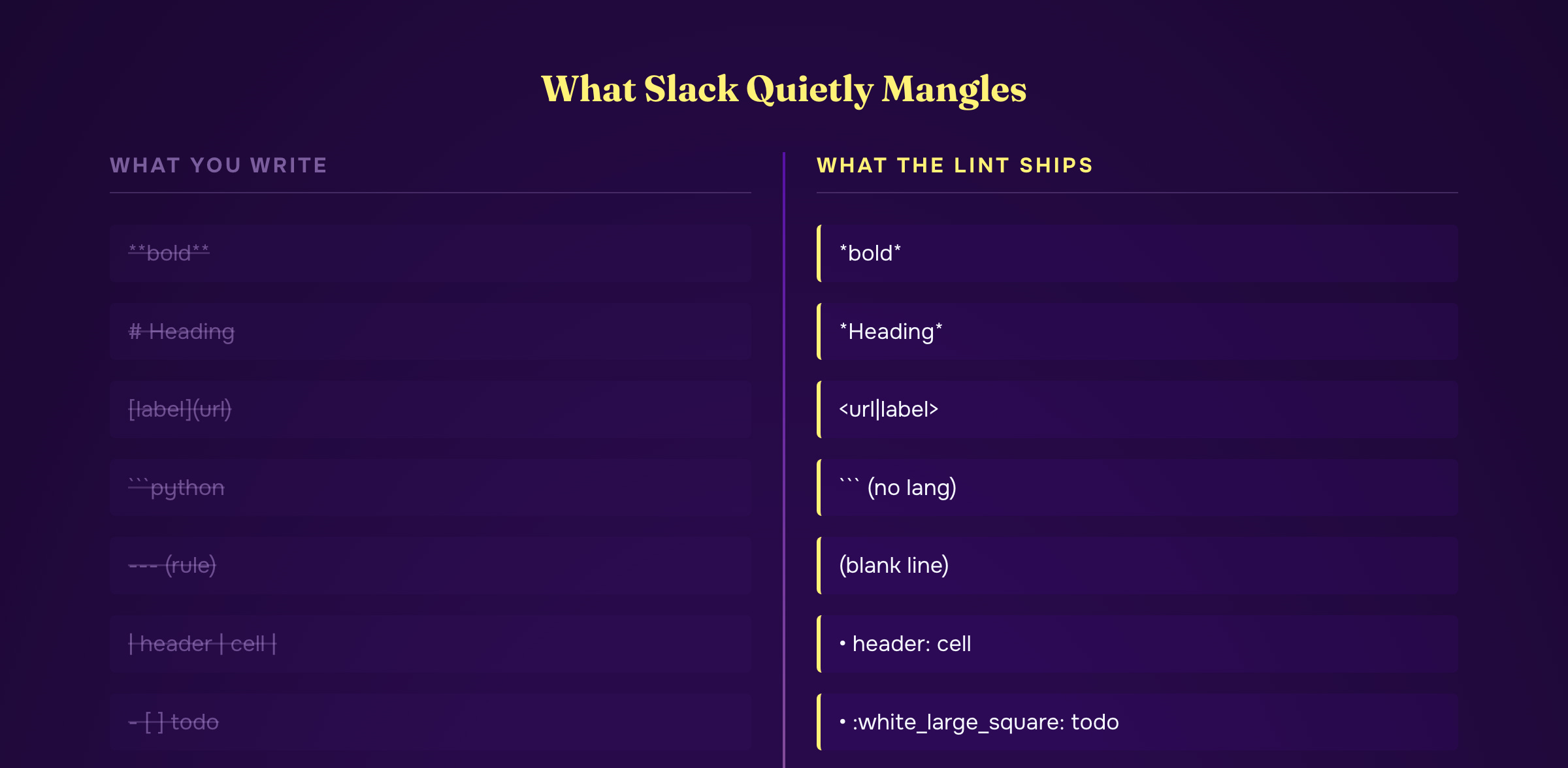
I tested it end-to-end on a realistic LLM-shaped draft that contained every trap on the list. Markdown headings. Double-asterisk bold. Bracket-paren links. Pipe tables. Horizontal rules. Checkboxes. Raw angle brackets. All of it. The lint caught all eight. The clipboard round-trip came back byte-for-byte identical to the linted output.
The model writes correctly because the references tell it how. The lint reruns anyway. Belt and suspenders.
Ask once, save, reuse.

Slack pings need a real user ID. @username looks fine but doesn’t notify the person. I’ve watched too many "hey @sarah, can you confirm?" messages disappear into the void.
So the skill keeps a small contacts file: name → Slack ID. First time it sees a name worth tagging, it asks once. "I’d like to tag Sarah — what’s her Slack ID?" It tells you where to find it (profile → three dots → copy member ID) and gives you a skip option. The answer gets appended. Forever after, no questions for that name. If you skip, plain @Sarah falls back, and the preview warns you it won’t actually ping.
One user-editable file. Zero recurring friction.
The shape, generalized
Most “format my output for X” hacks are a tangle of one-off fixes that breaks the next time the model writes something unusual. A new Markdown construct, a different code-fence style, a list-item shape nobody saw before — the patches silently let it through.
This skill isn’t that. The shape, in order:
Three research agents in parallel, dumping their findings to disk as reference docs.
A skill description pushy enough that it fires on natural phrasing — no new vocabulary required.
A model that writes from the bundled references, not from training-data memory.
A deterministic lint as the final pass — idempotent, end-to-end verified.
One user-editable file (contacts) for the only real per-environment data.
Output lands in the clipboard. You paste. It renders.
That’s the right shape for this kind of post-process. Deep research up front. Bundled context. Determinism at the boundary. Minimal user surface. Idempotent and verified.
Get the skill
One line. Clone it into your Claude Code skills directory:
git clone https://github.com/SantaJordan/slack-recap-skill.git ~/.claude/skills/slack-recapClaude Code discovers skills in ~/.claude/skills/ automatically. Next session, say "Slackify this" and it fires. The full source — SKILL.md, the 200-line lint, all three reference docs, the contacts template — is on GitHub.
What Annual Adds
This one was free. Paid gets the build. Annual gives you the tools that run it.
Every tool I ship. Edge Copilot installs to your Claude Code — talk to all my knowledge, every method, every data source. Current: Edge Copilot, AutoClaygent, Agent 7, Who to Target and What to Say, Blueprint Cloud, Technology Finder, Video List Extractor, Competitor Monitor, LinkedIn Engagement, Domain & LinkedIn Finder. Whatever ships next is included.
All 3 courses: Who to Target and What to Say, Agent 7, AutoClaygent.
Weekly office hours.
License key hits your email.
→ Go annual — $2,499/yr · Start at $50/mo (most readers start here)

