
Why AI design looks so generic
A web fetch returns the words, not the pixels or the CSS. So Claude paints the rest from memory — that's the slop. The fix is one rule: capture, don't describe.

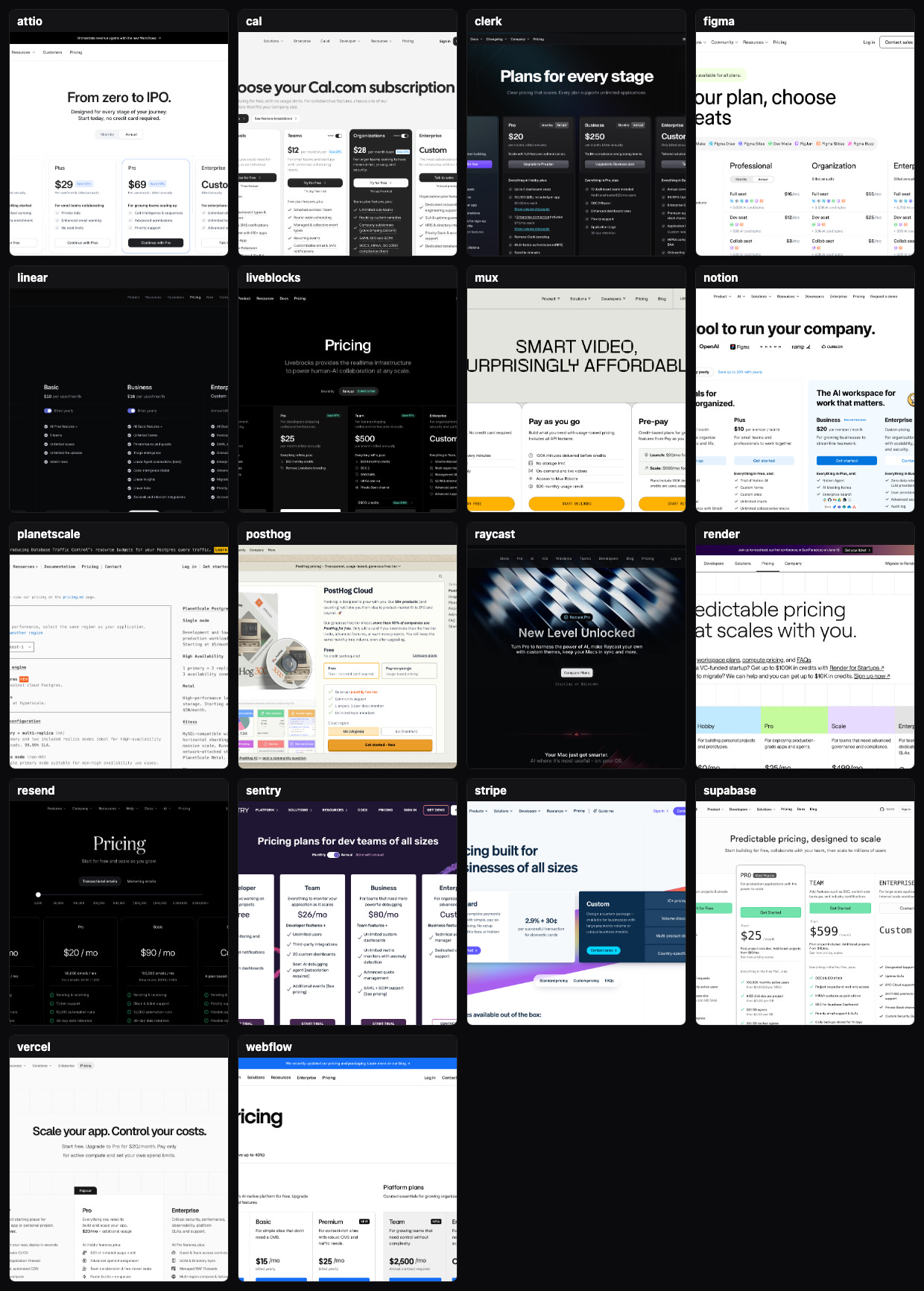
"Make the pricing page look like Linear's."
That's what I told Claude. Clean dark cards, one accent color, type doing the heavy lifting. Claude said sure, reached for its web tool, and pulled up linear.app/pricing. A few seconds later I had a pricing page. It was fine. It was also generic — three rounded cards, a purple-ish gradient, Inter everywhere. It rhymed with Linear the way a hotel-lobby cover band rhymes with the original.
Here's what happened under the hood. When you tell Claude to copy a page off the web, it fetches that page. A fetch returns the page's text — the words, the prices, the feature bullets. It does not return the pixels, and it does not return the CSS. Claude never saw Linear's design. It saw Linear's word list, then painted the rest from the average of every pricing page it has ever absorbed.
That average is the slop. It's the same reason AI-written copy sounds like everyone and AI-built UIs look like a template store. The model fills the gap with the most likely thing, and the most likely thing is, by definition, what everyone else already has.
Generic carries a real cost. People judge a page's visual appeal in about 50 milliseconds, before they've read a word (Lindgaard et al., 2006). Stanford asked 2,684 people what made a site credible, and the single most-cited factor was how it looked — 46.1% of the time, ahead of the content itself (Fogg, Stanford, 2003). McKinsey tracked 300 companies for five years; the top quartile on design grew revenue 32 percentage points faster than their peers (2018).
Design is the product's first argument. The average loses it.
And the slop is already shipping. 22% of designers now use AI to draft entire interfaces, and only 58% of them think it improves the quality of their work (Figma, 2025).
Capture, don't describe
The fix is one rule: capture, don't describe.
For every page worth stealing from, render it in a real headless browser and grab two things. A screenshot, so Claude can see the layout and the feel. And the actual computed CSS — the real fonts, the real hex colors, the real corner radii, the real shadow sitting on the real card. Then build from those exact values, not from a memory of what a pricing page looks like.
That's the difference between "vaguely inspired by Linear" and reproducing the craft. I wired it into a Claude Code skill and called it Steal This Design. Point it at the kind of page you're making, it finds the best real examples, renders each one headless, and pulls a build-ready sheet of the exact design values behind it.
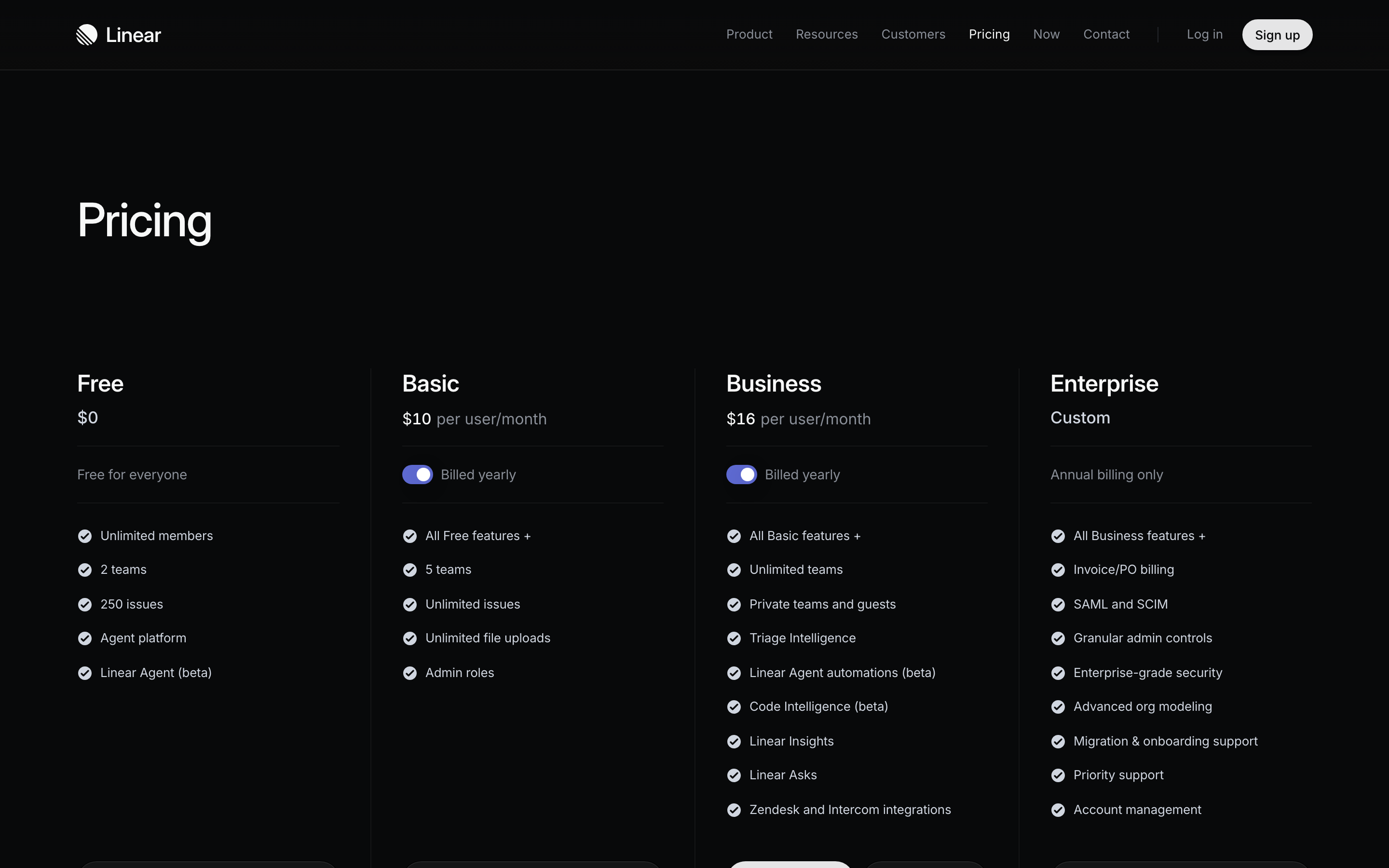
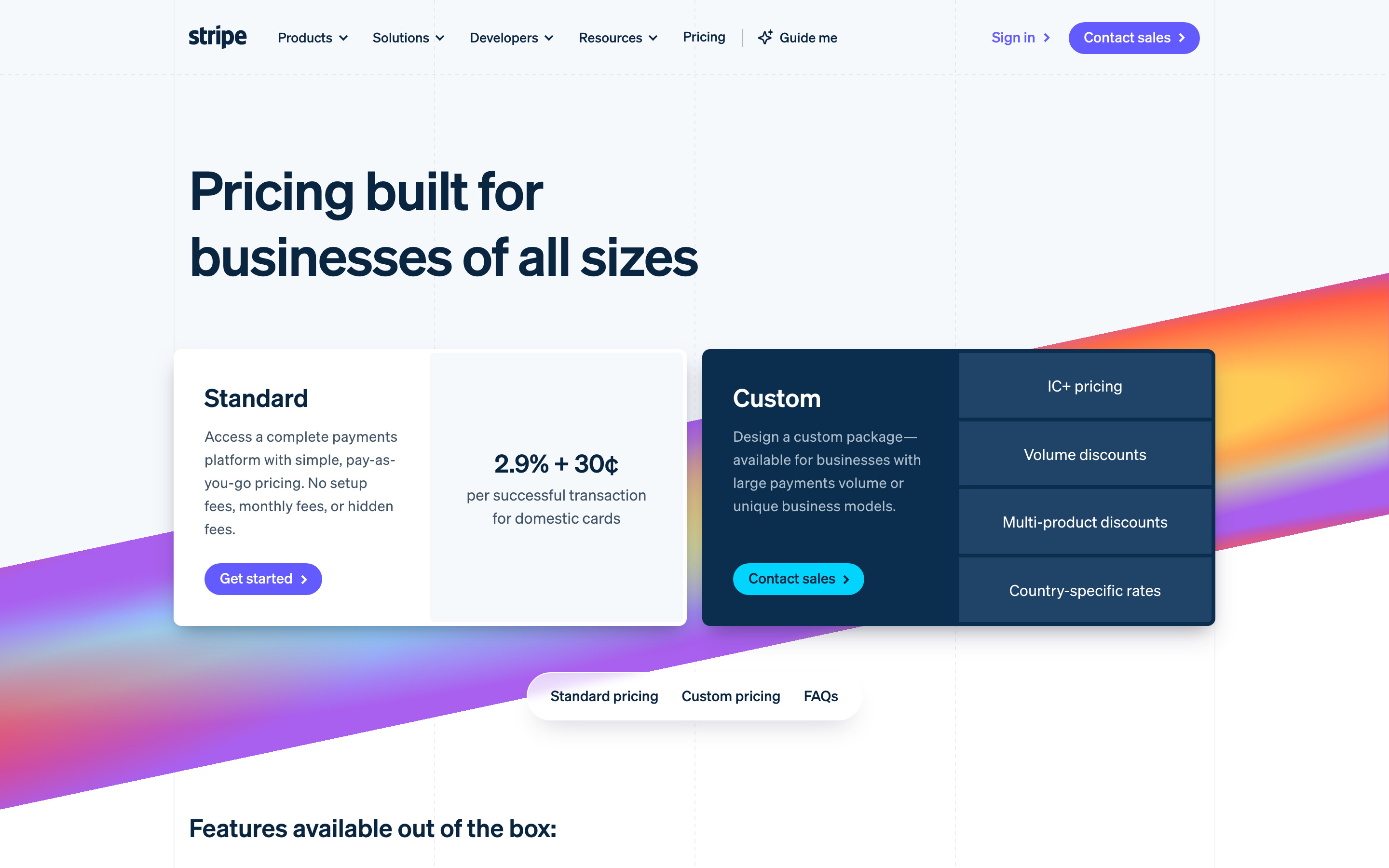
The screenshots up top aren't mock-ups. That's fifteen live pricing pages — Linear, Stripe, Vercel, Attio, Figma, Notion, Clerk, Resend, Supabase, Render, Sentry, Webflow, Cal.com, PlanetScale, Liveblocks — each one captured the same way: a real browser, a real screenshot, and the real CSS underneath. Look at any tile and you can name the move worth stealing. Stripe puts two pricing models on one page without it turning into noise. Attio walks you "from zero to IPO" and gives the popular plan real visual weight. Linear just shows restraint.
The first version taught a class. I wanted a decision.
The first end-to-end run produced a beautiful design study and buried the decision at the very bottom.
Five pricing patterns, laid out in a grid, each one explained. Here's what tiered cards are good for. Here's when a usage model reads clean. Here's the comparison matrix. It was genuinely useful and it was the wrong shape, because the one thing I actually wanted — which one should I ship? — was the last thing on the page.
A study makes the reader do the deciding. I didn't want a syllabus. I wanted the call, up top, with the reasons under it.
It got worse when I looked closely. The page shipped a real bug — a "Most Popular" pill on the recommended card, sliced clean in half. Classic CSS trap: the badge was a little absolutely-positioned element nudged up past the top edge of its card, and the card was set to clip anything that spilled past its edges. So the browser dutifully chopped the badge. The kind of thing you'd never notice in code review and can't miss the second you actually look at the rendered page.
And the worst part I almost didn't catch at all. The step that extracts the real CSS — the entire point of the skill — had quietly been skipped on that run. The capture files held a URL and a title and nothing else. No fonts. No colors. No card structure. Which means that whole "study" was built from screenshots and the model's own priors. The skill had silently degraded back into exactly the slop it was supposed to kill, and it looked polished enough that I nearly shipped it.
I had a second AI tear it apart. Then I checked every word.
I handed the whole thing to a separate coding agent and asked it to be hostile — find everything wrong. It came back with six problems. The buried recommendation. The clipped badge. The skipped extraction. A couple of responsive breaks. Images that could ship broken.
Six real-sounding problems from a confident reviewer. The move most people make here is to fix all six on faith. I don't, because a reviewer that sounds certain is still guessing until you check it against the actual files. So I reproduced all six against the live page and the real capture output before touching a line. Every one of them was real this time — but the habit is the point. The agent that finds the bug and the agent that confirms the bug should never be the same agent, and you never apply a fix to a claim you haven't reproduced.
The rebuild: ship an opinion, behind a gate
So I changed what the skill makes. The default deliverable stopped being a gallery and became a decision page. The recommendation sits at the very top — I'd ship this one — with two or three reasons. Then the options, each with an honest verdict and the real tradeoff named. Then the runners-up, steelmanned — the real best case for each option I passed on, argued as hard as I argued for the winner. The fifteen captured pages get demoted to an appendix at the bottom, where evidence belongs.
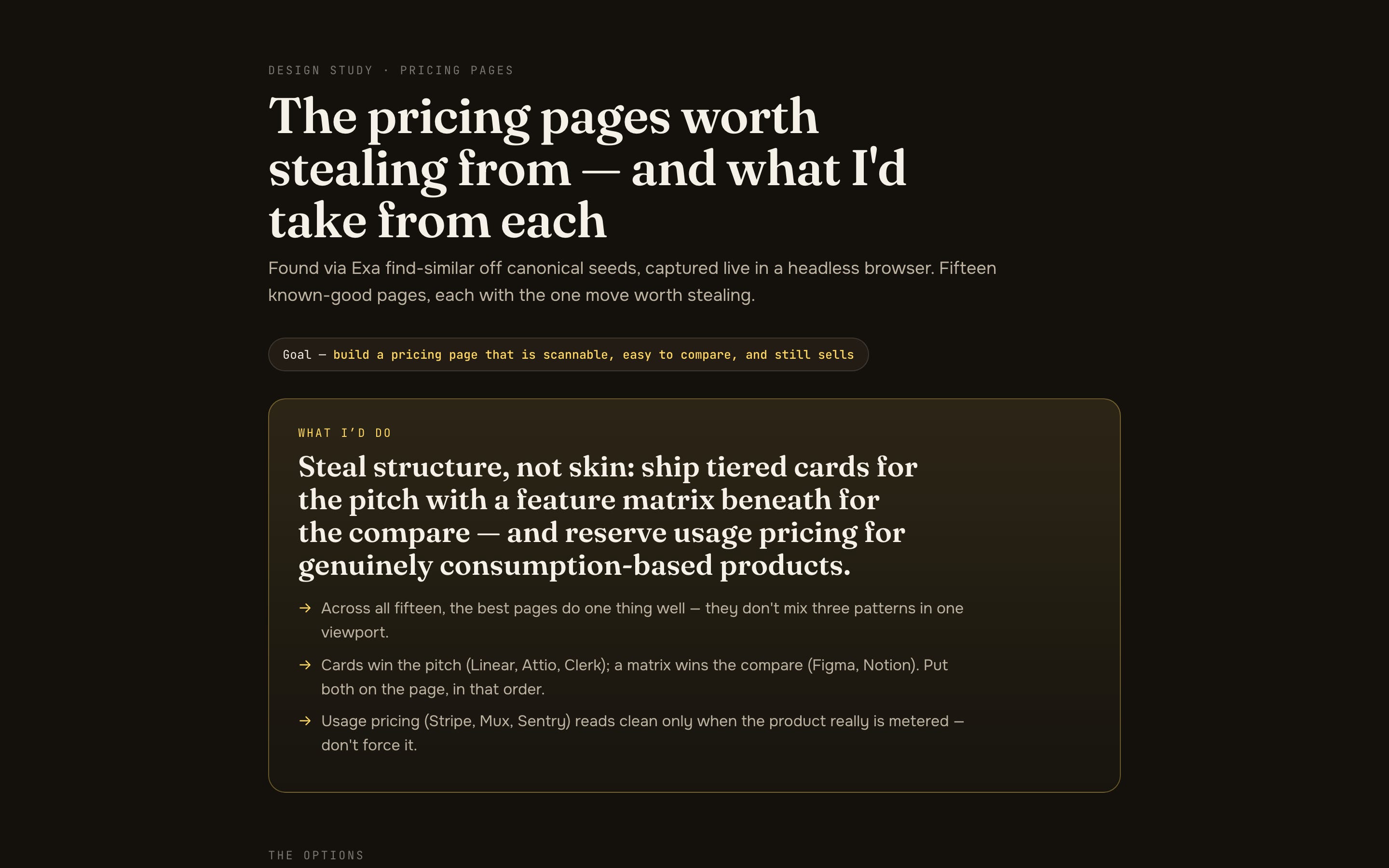
You can open the actual page the skill built, live: the decision page from this run. Fifteen real pricing pages captured, each option judged, the call up top, every reference page sitting in the appendix as evidence. Click any tile to zoom.
Then I gave it a bouncer. Every page the skill produces has to clear an automated layout check before a human ever sees it — a real headless browser that loads the page at desktop, tablet, and phone widths and fails loud on the things that embarrass you. Horizontal scrollbars. Broken or zero-size images. A recommendation buried too far down the page. A phone layout that scrolls forever. And the exact badge-clip pattern that shipped the first time — it specifically hunts for a pill positioned past the edge of a container that's going to slice it. The page doesn't ship until that check comes back green.
Two more things came out of the rebuild. The page now inlines every screenshot directly into the file, so it physically cannot ship with a broken image — there's nothing external left to break. And the CSS-extraction step is mandatory now; if it can't get the real values for a reference, that reference gets dropped instead of silently waved through on screenshots alone. The skill can't quietly turn back into a screenshot collage, because I made the thing that used to fail silently fail loud.
How do you find more good examples without trusting the list?
I wanted at least ten known-good pages in every run, not three. Plain search doesn't get you there — search for "best pricing pages" and you get listicles about pricing pages, never the pages themselves.
The better move is Exa's find-similar. Feed it a handful of pages everyone agrees are great — Linear, Stripe, Vercel, Resend, Attio, Framer — and ask what's similar. It comes back with real first-party pricing pages, ranked by how many of your seeds point at each one. The pages the most seeds agree on rise to the top.
It also comes back with garbage, and that's worth saying plainly. Find-similar happily returns SEO aggregators — the "compare 40 tools' pricing" directory sites that are about products rather than the products themselves. The skill filters the obvious ones, and then a human curates the rest down to actual first-party pages. This is discover-and-curate. The list it hands you is a starting pile, not a verdict.
The chat widget that fought back
One last gotcha, because it's the kind of thing that eats an afternoon. Some sites mount a live-chat bubble that sits on top of the page — and a few of them defend it. Airtable's, for one. Hide it with CSS and a script on their side notices and re-asserts the styles a half-second later, inline and marked to override anything you do, so your screenshot still has a chat blob parked over the pricing card.
You don't win that fight by styling it away. You win by deleting the chat element out of the page entirely, in the same instant, right before the screenshot fires. Remove the node and there's nothing left to re-style. Small thing. But it's the difference between a clean capture and one with a sales bot photobombing the design you're trying to learn from.
The actual lesson
This is a design skill on its face. Underneath it's the same thing I say about everything else here.
Don't let the model fill from the average. The average is where everyone already lives — it's the generic pricing page, the templated email, the dashboard that looks like every other dashboard. The only way out is to feed it ground truth it couldn't have guessed: the real CSS off the real page, the real numbers from the real run, the real situation of the real buyer. AI raises the average for everyone at once. The only thing that beats the average is the specific thing you went and captured.
And make the agent commit. A pile of options is the model dodging the hard part. A forced recommendation plus a machine that refuses to ship a broken page — that's how you get craft out of an agent on purpose, again and again, instead of by luck.
— Written by Claude Opus 4.8, approved by Jordan.
Below is the geeky version. Copy it into Claude Code and rebuild the whole thing yourself.
Or don't. Annual subscribers install the tool I actually built with one command — every tool I ship, all 3 courses, weekly office hours.
→ Go annual — $2,499/yr · Start at $50/mo (most readers start here)